- UX design
- Product concept
Personalizing the YouTube Experience
A UX concept for giving YouTube users direct control over their feed, replacing algorithmic repetition with transparent, conversational personalization.
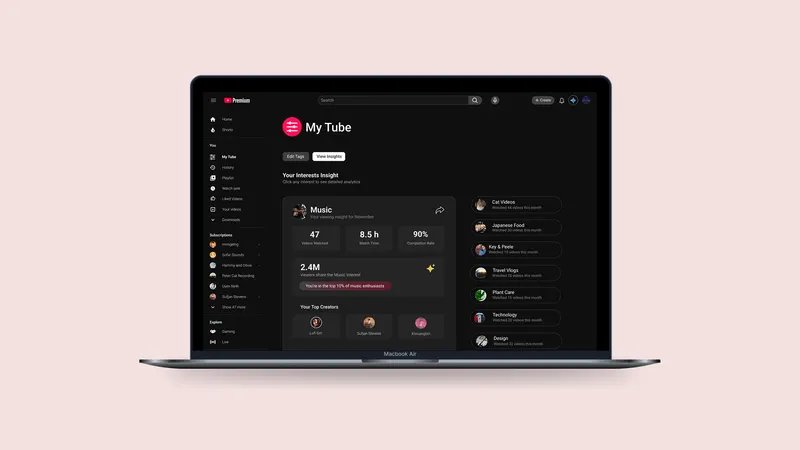
- 4 Key features designed
- 2 User personas researched
- 3 Behavioral principles applied
- 5 Users tested through peer usability sessions
The problem
The frustration is not hard to find. Across Reddit, Twitter, and YouTube's own help forums, users have been saying the same things for years.
-
My YouTube sucks. I'm always looking for stuff to kill my time and YouTube recommends the same crap videos 500 times in a row. It takes a long time to find something I want to watch.
Reddit -
Whenever I click "Not Interested" on a video and refresh YouTube, the platform still serves me the same kind of content.
Reddit -
Why am I getting the same recommended videos for days straight?
Twitter -
I watched one video of someone on a sailboat. One. Now all YouTube wants me to watch are those stupid videos of people travelling the world on their sailboats.
Help Forum
Starting point
Assumption
YouTube pushes content onto viewers: often repetitive, unwanted, and outside the viewer's control. The platform prioritizes engagement metrics over genuine personal relevance.
Thesis
Put the You back in YouTube, by letting users control what they see and share.
Outcomes
-
Business
Make YouTube feel personal so people stay longer and creators reach the right audience.
-
Experience
Create a feed that feels fresh, less repetitive, and easy to trust.
-
Branding
Show YouTube as a platform that respects choice and stays true to real user preferences.
User types
-
Casual Explorer Age 24 Daily · Short sessions

Drops in to browse. Wants light variety without seeing the same things again.
- fresh
- mixed
- show something new
Uses YouTube for
- Entertainment and music
- Trending clips
- Light discovery while relaxing
Top concerns
- One video hijacks the whole feed
- Too many unwanted pushes
- Homepage feels cluttered and repetitive
-
Deep Diver Age 32 Weekly · Longer sessions

Comes to learn. Wants focused content without getting distracted by unrelated suggestions.
- organize
- filter
- relevant
- keep it on topic
Uses YouTube for
- Tutorials and how-to videos
- Coursework and skills practice
- Long-form guides and educational channels
Top concerns
- Recommendations drift away from the topic
- Hard to steer feed toward learning goals
- Noisy, cluttered homepage
User story
Job to be done
Make it easier to discover and control content that truly feels personal.
Key features
-
My Tube
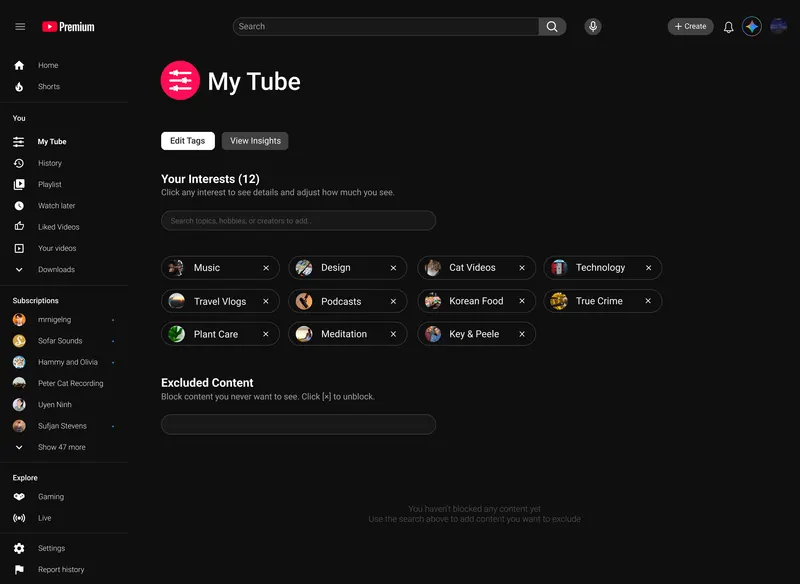
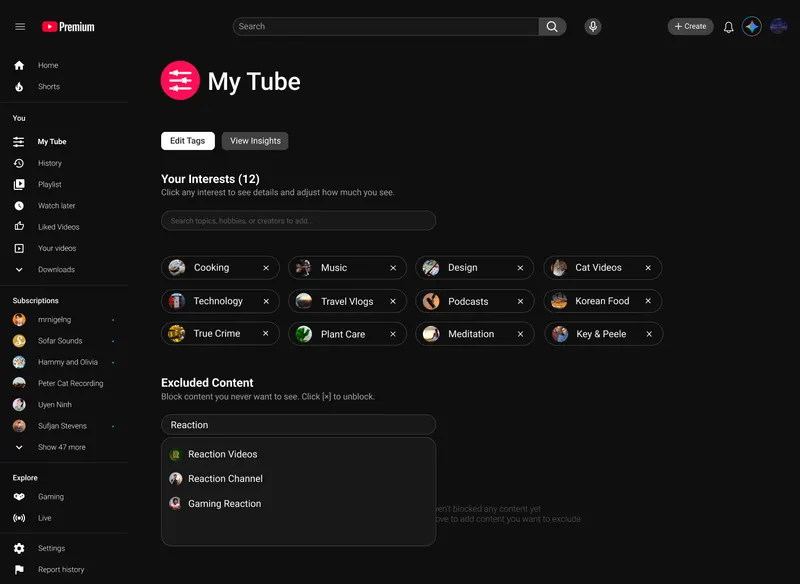
Manage what you see. Add, remove, or avoid categories. Direct control over the feed without going deep into settings.
-
Insights
Look back on your viewing journey. See how your interests evolved, spot patterns, and understand your own habits.
-
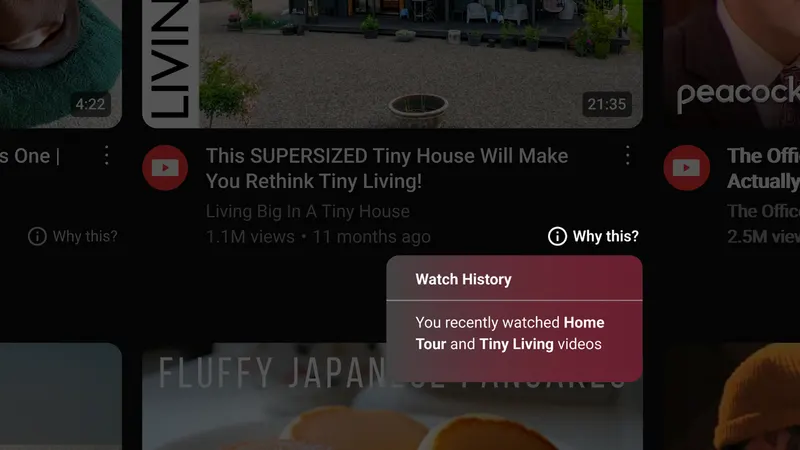
Why This
Shows why a video appears, so viewers understand what shaped the recommendation. Transparency over black-box algorithms.
-
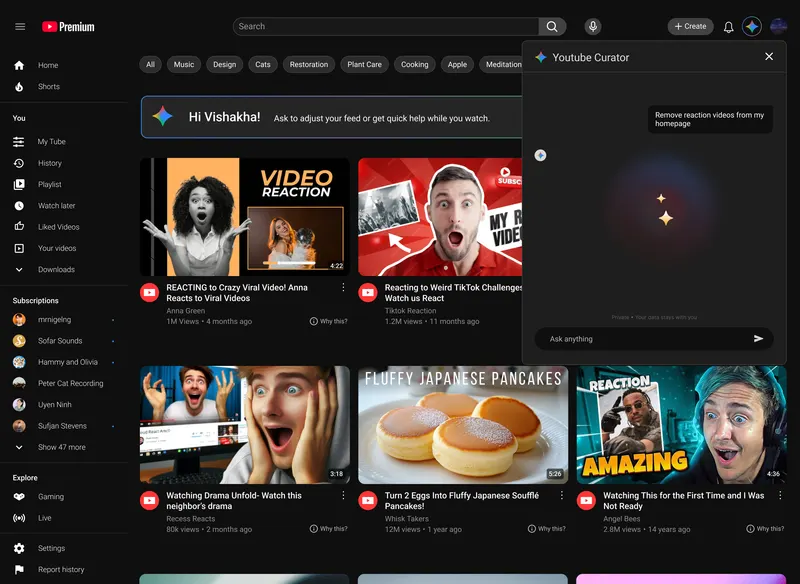
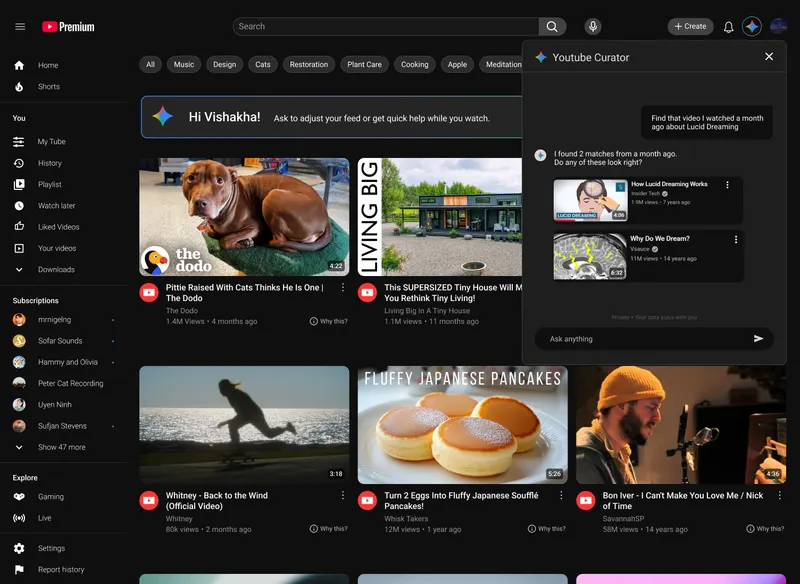
YouTube Curator
An AI assistant that helps users find, manage, and personalize their experience through natural conversation.
Killer feature
YouTube Curator
A conversational Gemini-powered assistant that helps users find, manage, and personalize their YouTube experience through natural dialogue. Instead of navigating menus and settings, users simply talk to their feed.
"Remove reaction videos."
The feed updates instantly. No menus, no settings, no friction.
Experience journey
The redesigned experience moves from a passive, push-only feed to an active loop where the user shapes the content at every step.
User insights
The prototype was tested with peers in a classroom setting. Participants reflected on all four features across a structured walkthrough session.
What worked
- Curator significantly cut down repetitive filtering work
- Users loved the "instant" feeling of adding and removing tags in My Tube
- "Reflection Insights" created fun, unexpected engagement
Suggestions from users
- Make My Tube easier to access from the main navigation
- Add time filters for Insights (Weekly / Monthly / Yearly)
- Make Insight Cards shareable on social media
Behavioral design
Three principles from behavioral psychology shaped how each feature was designed to feel natural and motivating rather than complex and demanding.
-
Feedback Loop
We are engaged by situations where we can see the results of our actions.
When users edit preferences or talk to Curator, updates appear instantly in their feed. The system adjusts recommendations across YouTube in real time.
Users see proof that YouTube actually listens.
-
Autonomy
We are motivated when we feel we have control over our actions and environment.
Active users adjust tags in My Tube. Passive users let Predictive Suggestions adapt automatically. Conversational users simply talk to YouTube through Curator.
Everyone personalizes their experience their own way.
-
Cognitive Ease
We prefer things that are easy to think about, understand, and act on.
YouTube Curator replaces complex settings with natural conversation. Predictive Suggestions use friendly, human prompts. The whole system feels intuitive and light.
When things feel simple and natural, people start to trust.
Marketing plan
A phased rollout that starts quiet, builds credibility through creators, and scales through shareable content.
-
Early access
Small early access group. In-app notification: "Meet your new feed assistant." Low noise, high intent.
-
Creator partnerships
Partner with YouTubers to make short clips showing how they use the features to curate their own feed. Trust through familiar voices.
-
Full launch
Release shareable Insight Cards for easy social sharing. Full ad campaign rollout.
High fidelity prototype
The full prototype covers the personalization hub, Curator conversation, and Insights view. Each screen was designed within YouTube's existing visual language to keep the feature additions feel native rather than bolted on.
Edit Tags
-
Add interest tags using search to shape your feed.
-
Block channels, topics, or formats with a clear excluded list.
View Insights
-
View all interests with monthly watch activity at a glance.
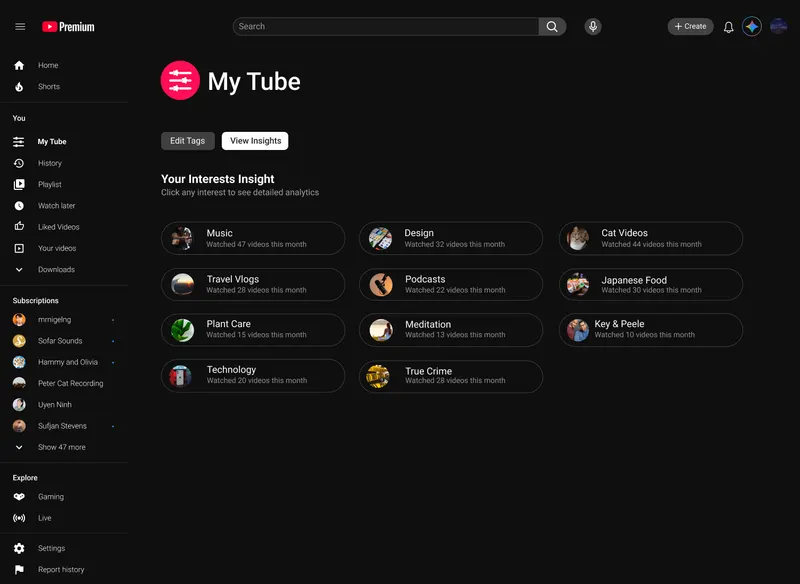
-
See detailed insights for each interest, including stats and top creators.
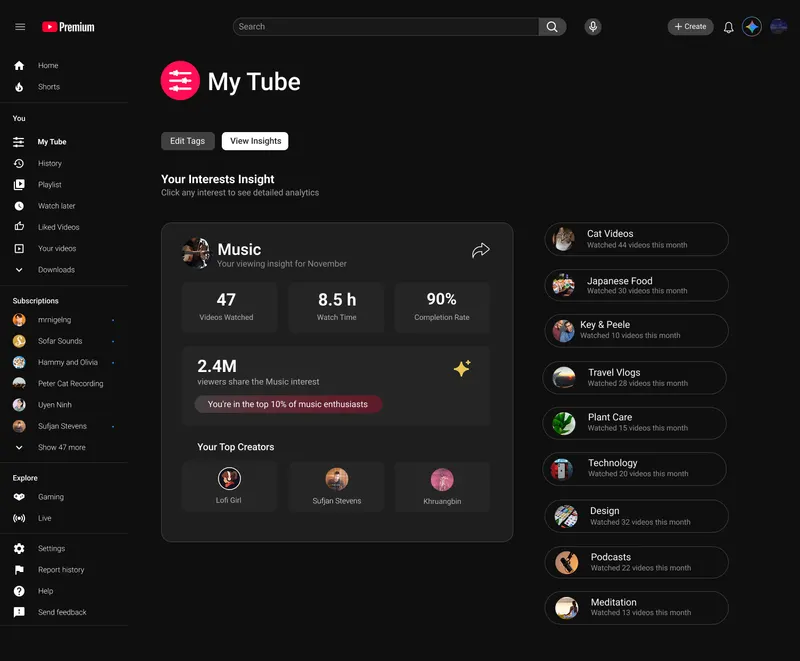
YouTube Curator
-
Ask the curator to remove specific content from the feed.
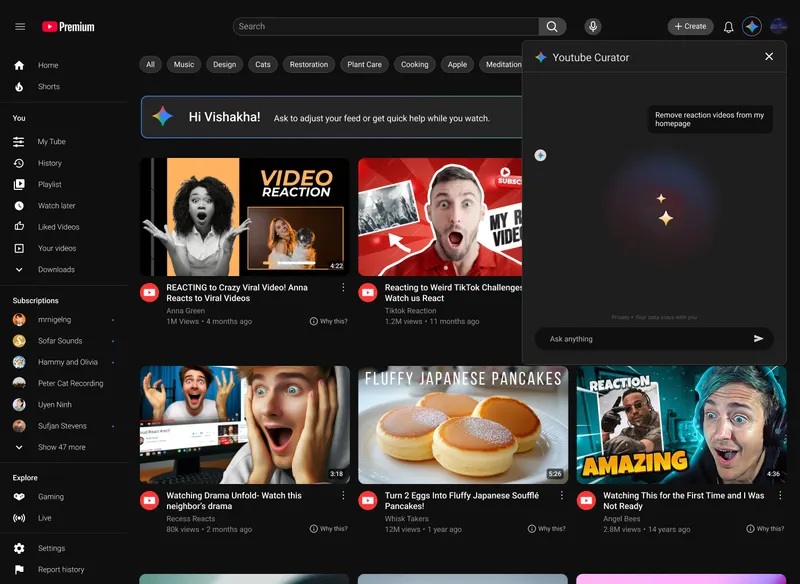
-
Feed updated with changes, with optional follow-up.
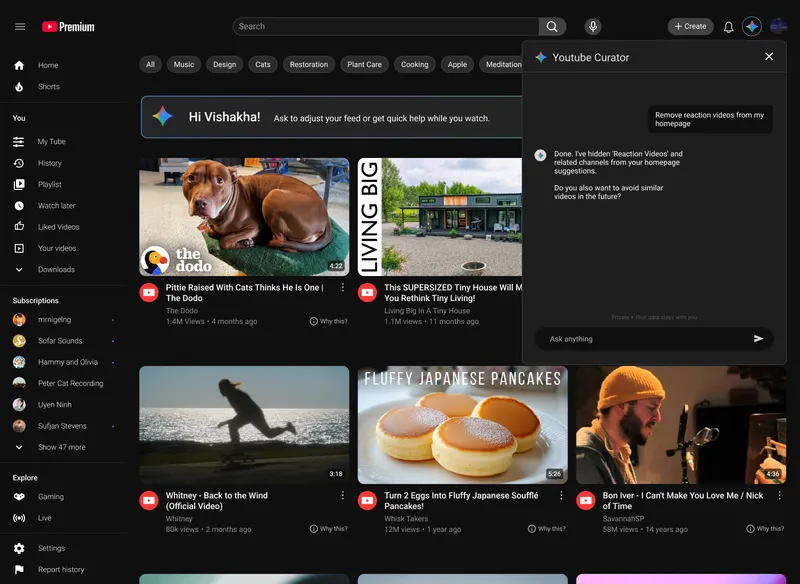
-
Find videos you’ve watched before, even if you don’t remember the title.
-
“Why this?” explains recommendations based on subscriptions and watch behavior.
Personalizing the YouTube Experience is a proof of concept for a more honest relationship between YouTube and its users. The thesis was simple: give people real control over what they see, show them why they are seeing it, and let them talk to the platform directly.
When users have clarity, they stay because the content is actually what they came for. Not because the algorithm kept them there.